Know what every rep did today.

One live picture of your whole field team — pipeline, contact rates, and today’s deals, without chasing anyone for an update.

sales.canvast.ca/dashboard
Canvast contact rate card showing 40 percent, 136 of 340 doors reached, with door outcomes broken out by appointments, declined and no contact.
SocialRiseBuilt to run SocialRise’s own field team

Everything in the field, one place.

Sales, installs, and funnels from every rep.

01
Sales tracking

Follow every deal from first knock to signed — by rep, team, or product.

02
Install tracking

Reconcile the carrier’s file against the leads that sold them, so you know what actually got installed.

03
Funnel tracking

Watch leads move stage by stage and spot where deals stall — before they go cold.

04
Data at a glance

Contact rates, leaderboards, and trends — no end-of-day exports.

[ Built for the rep ]

If the reps won't use it, none of this matters.

Every field tool dies the same way — it works fine in the office and falls over on a doorstep with one bar of signal. Canvast is built the other way round.

It works with no signal

Leads, pipeline, and today’s list are stored on the phone. A rep can open a door, change its status, add notes, and book an appointment with no connection at all — it syncs when they’re back in range.

A status change is a tap and a chip

From the map, a rep taps a pin and picks the next status off the sheet. No form, no confirm step, no hunting through a menu for the common ones.

There is no Save button

Typing saves itself, taps save straight away, and nothing is a required field. A rep can never lose a door because they walked away from a half-filled form.

Every change stays on the lead

Each status a door moves through is written to its history, so you can open any lead weeks later and read how it got where it is — not just where it ended up.

On the phone, no signal
✓Open and edit any of their leads
✓Create a new door on the spot
✓Change a status from the map
✓Book an appointment
✓Raise an escalation
Offline — edits are saved on this phone

The app shows a pending count until everything has gone up. Edits survive closing the app and signing out.

Your pipeline, end to end.

Every lead in its stage — from Not Contacted through Declined, Potential, Closed, Installed, and Paid, or flagged Broken when a deal falls through. One board, your whole pipeline — and those seven are only the default: the statuses, and the columns they roll up into, are yours to set.

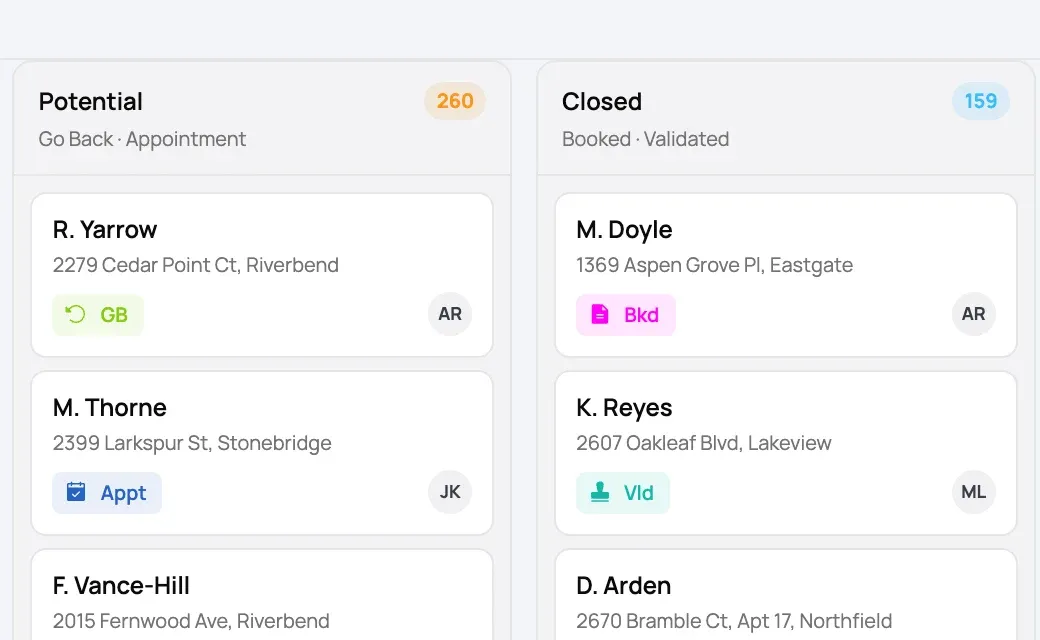
The Canvast pipeline board showing all seven stage columns — Not Contacted, Declined, Potential, Closed, Installed, Paid and Broken — each with its lead count and the first lead cards beneath.
Two pipeline columns at close to actual size, showing each lead's address, stage pill and the rep it belongs to.
Up close

Every card carries the address, the stage it sits in, and the rep who owns it — so a manager can see where a deal is without opening anything.

Draw the ground. See what's on it.

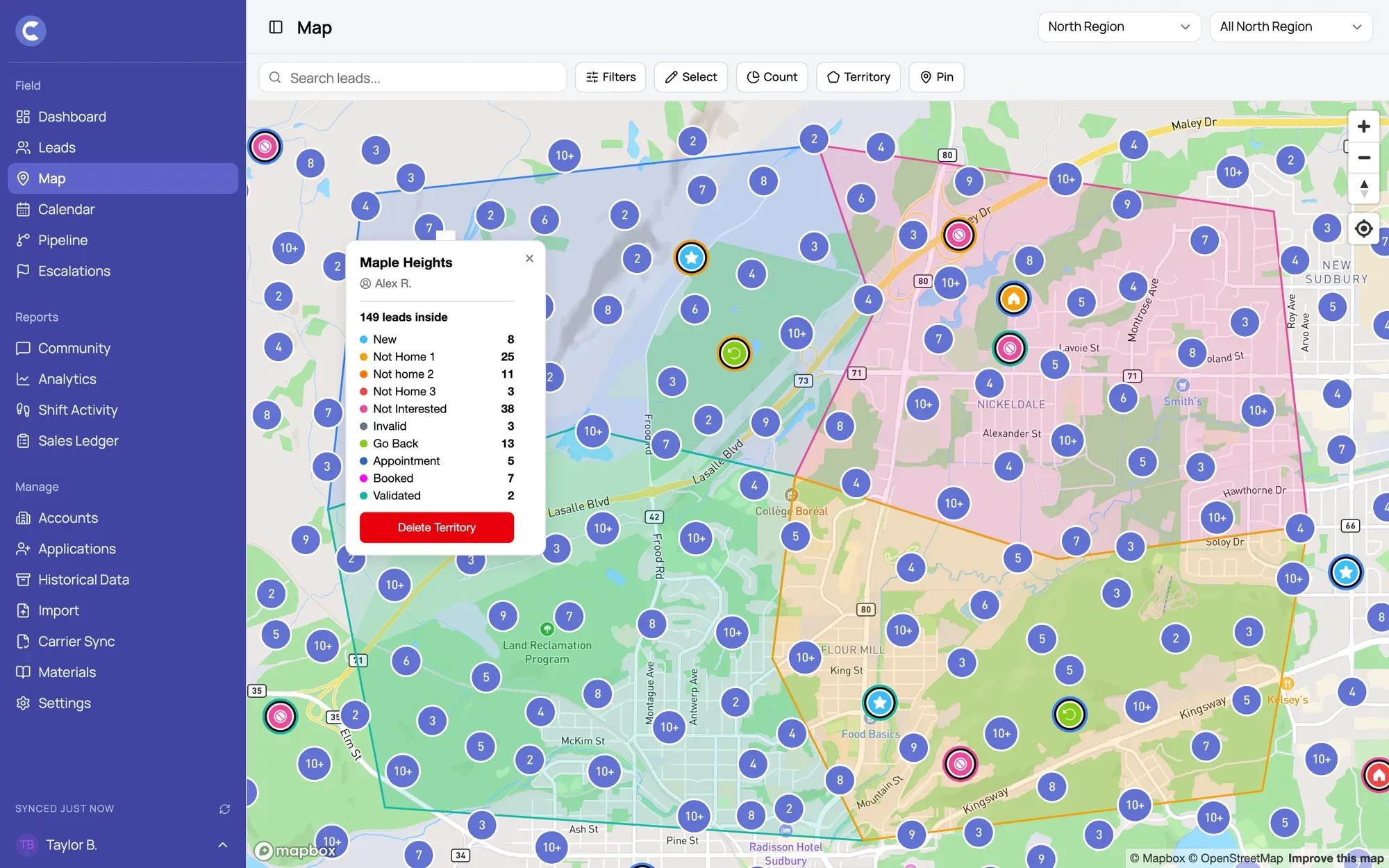
Trace an area on the map, click by click, and Canvast counts what's inside it — how many leads, how many reps, and how much of it is already booked or further. It counts whatever the map is filtered to, and tells you what that filter was.

✓Count any area you draw, not just a saved one — trace it on the spot and read the total.
✓Counts follow the map’s filters, so you can scope one to a status, a rep, or a campaign.
✓Admins save an area to a rep at the moment they draw it.
✓Saving can move the leads already inside over to that rep, if you want it to.
✓The rep sees their own area drawn on their phone, without being fenced into it.

Drawing and counting happen on the manager-side map; saving an area to a rep is an admin job. The rep's phone just shows them the shape.
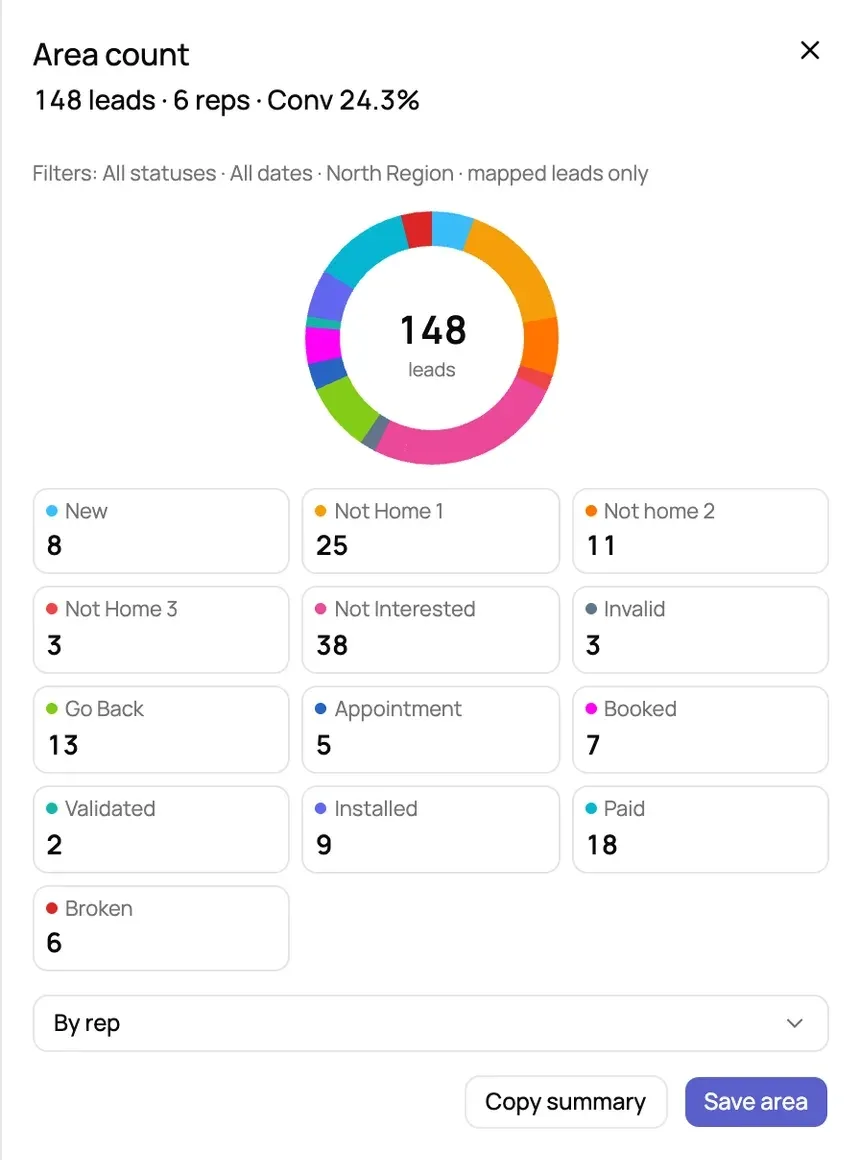
The Canvast area count sheet reading 148 leads, 6 reps, Conv 24.3 percent, with the filters it was counted under and a breakdown by status.
Four adjacent territories drawn over a street map, each tinted in its rep's colour, with one area's panel open showing its assigned rep and the leads inside it.
Map data © Mapbox © OpenStreetMap. Areas and lead data are illustrative.

Know who’s winning, every day.

Weekly leaderboards rank every rep by units sold for the week, ties included. Spot your top performers, coach the rest, and run friendly competition that actually moves numbers.
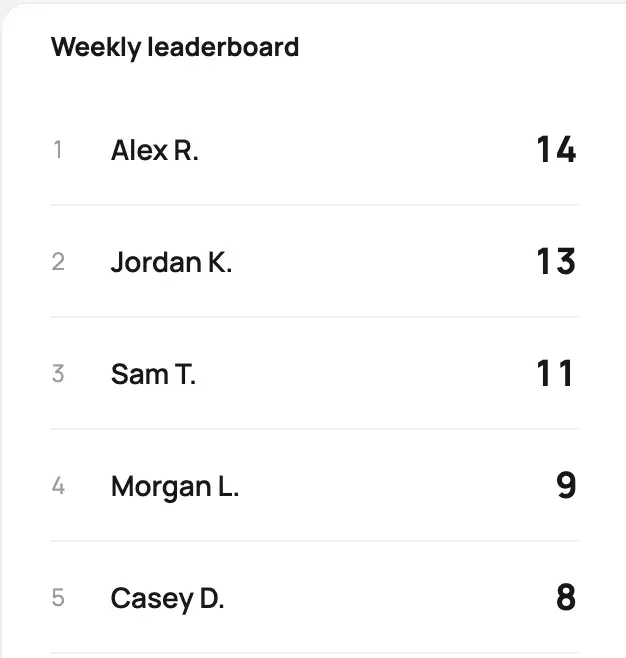
Canvast weekly leaderboard ranking five reps by units sold, from Alex R. on fourteen down to Casey D. on eight.

Every win, as your reps log it.

Bookings, payments, and installs appear as reps’ phones sync, and the page updates on its own — no refresh, so managers feel the momentum and never miss a win.
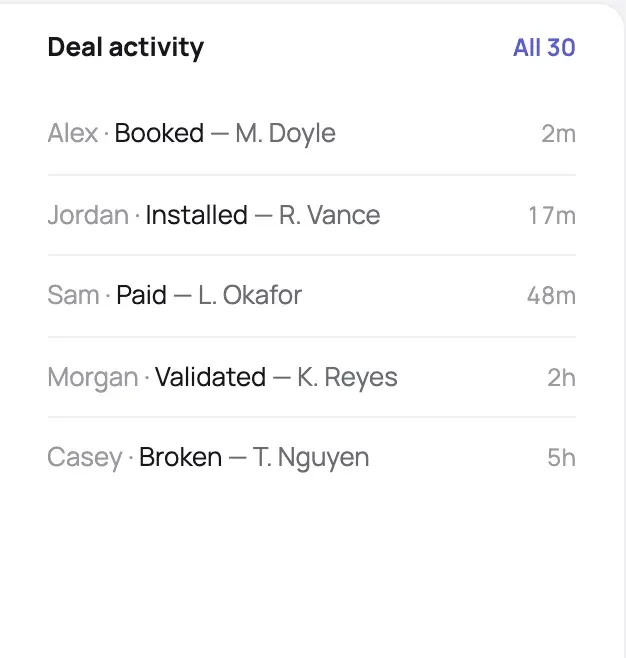
Canvast deal activity feed listing five recent events, each showing the rep, what happened, the customer and how long ago.

Not a demo. A daily driver.

30+
reps in the field daily
3
provinces · ON · NL · AB
Every day
live in production
SocialRise
The field team Canvast was built for, run on, and proven by — SocialRise runs on it across provinces, and the rollout keeps growing.
“I know what’s going on and where, instantly — the data’s just there.”
Avryl — Director of Operations, SocialRise
“Coaching got easier — the numbers show reps exactly where to push.”
Ferdous — Director of Sales, SocialRise

Stop chasing
the update.

We’ll get your team set up and live — no spreadsheets, no end-of-day guesswork.

Book a demo →See it in action
Canvast

Field-first software that turns scattered work into one live picture.

Product
Company
Resources
© 2026 Canvast. All rights reserved.
Powered bySocialRise